
Window and Door Quote Configurator: From Manual Quotes to Dealer Orders
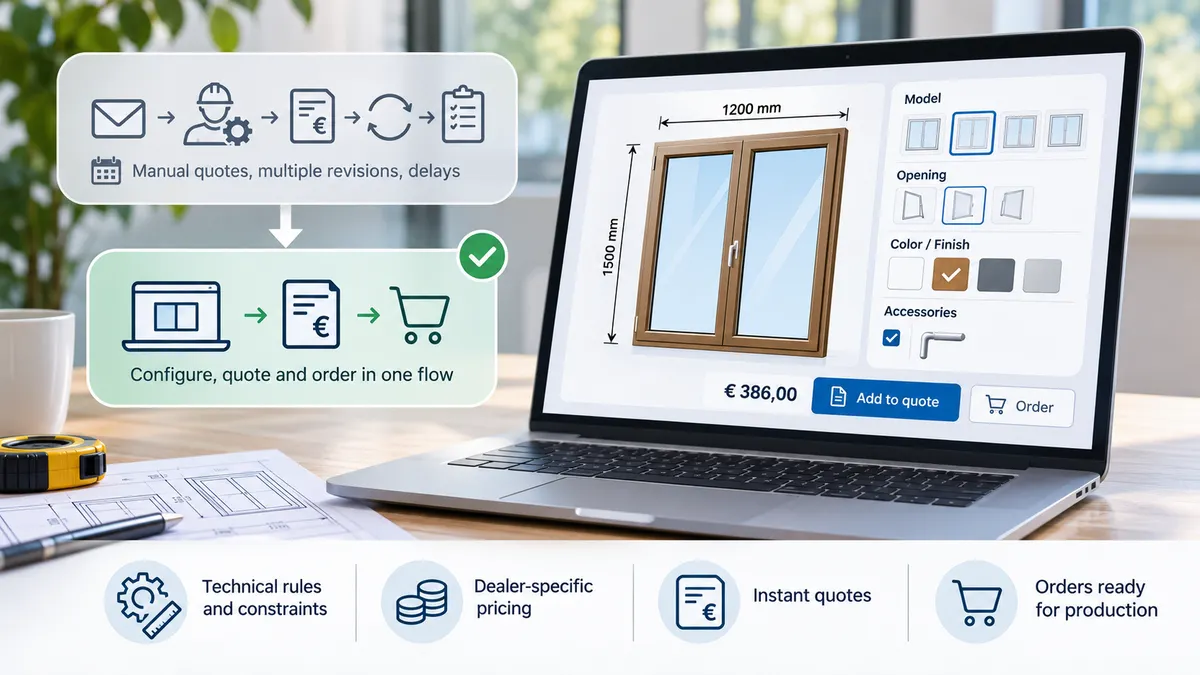
Manufacturers of windows and doors who sell through a network of installers and dealers know the process well: the dealer takes measurements at the customer's property, requests a quote, the technical department prepares it, the dealer forwards it to the customer, something changes, and the process starts again. When the order finally arrives, every line needs to be checked.
A quote configurator doesn't eliminate technical work. It moves that work upstream: you define the rules once, and dealers prepare their own quotes and orders, using their specific pricing.
The Quoting Process as a Bottleneck for Dealer Networks
How a typical quote works today
-
The dealer sends measurements and requirements by email, often with a photo or PDF.
-
The technical department interprets the request, checks feasibility, and calculates the price using that dealer's price list.
-
The quote goes back to the dealer, who adapts it for the end customer.
-
The customer changes a color or opening type, and the process returns to step 2.
-
When the order is placed, someone manually enters the configuration into the ERP system or production bill of materials.
Every step introduces potential delays or errors. And the technical department's capacity limits how many quotes the dealer network can request.
What the Data Says About Product Configuration
According to the B2B Digital Commerce & Experience Observatory at Politecnico di Milano (October 6, 2026), 60% of large B2B companies identify CPQ (Configure, Price, Quote) capabilities among their future areas of interest in artificial intelligence, specifically the automation and management of product configuration processes.
The same press release notes that the metal, electromechanical, and household appliance industries show more structured initiatives, driven by the need to manage sophisticated product catalogs and configuration and quotation processes.
This is nothing new for window and door manufacturers. What's new is that large companies are now explicitly identifying it as a priority.
Product Configurators and Dealer Portals: How They Work Together
A configurator for a dealer network works when three essential elements operate within the same system.
Technical Rules
Minimum and maximum dimensions, available opening types for each model, compatible colors and materials, and supported accessories.
These rules currently exist in the technical department's knowledge or in Excel spreadsheets. In a configurator, they become built-in constraints: dealers cannot select combinations that cannot be manufactured.
Dealer-Specific Pricing
The price calculated by the configurator must match the pricing conditions of the dealer using it, including their individual price list or group discount.
Otherwise, the dealer sees the standard retail price and still needs to contact the manufacturer.
In a B2B portal, this works when the configurator and customer-specific price lists are integrated into the same platform.
Orders That Flow Directly Into Production
The selected configuration must be included in the order with every option and specification, without manual data entry.
From there, the information flows into the ERP system or production process.
Markeplay's Window and Door Configurator
Markeplay offers a configuration engine for made-to-measure products, based on a "templating system and a proprietary formula editor."
It also provides an industry-specific solution for windows and doors: the Window and Door Configurator, a "ready-to-use vertical solution" designed for businesses that want to sell made-to-measure windows and doors online "with millimeter precision" (see the Configurator page).
You can try it through the public demo at www.configuratore-infissi.com.
The configurator is a built-in platform feature, not a separate app that needs installation.
It works alongside the B2B capabilities described on the B2B E-commerce page, including customer-specific, group-specific, and category-specific price lists, pricing visible exclusively to verified customers, and sales agents who generate quotes in real time and place orders on behalf of customers.
If you also sell directly to consumers, your products can be distributed through marketplaces in the Markeplay Connect ecosystem, including Infissifaidate.it.
For market information, including UNICMI data and building renovation incentives, read our article on online window and door configurators.
For a step-by-step approach to building a product configurator, see our guide.
How to Get Started With Your Dealer Network in Four Steps
-
Choose one product model and document its rules. Select one product series and list every permitted dimension, opening type, color, accessory, and pricing rule. If the technical department cannot document these requirements on one page, the configurator isn't the first issue to address.
-
Give three dealers access to the configurator. Choose the dealers who request the most quotes. Collect their questions and feedback during the first week.
-
Compare the quotes. For one month, have the configurator and the technical department prepare the same quotes independently. Wherever the results differ, review and correct the configuration rules.
-
Expand one model at a time. Add one product series at a time. Markeplay's setup service prepares the platform within 7 business days after the team receives all the required materials. More sophisticated configurators require a separate assessment [need: typical implementation time for a complete window and door configurator].
Frequently Asked Questions
What's the difference between window and door quoting software and an e-commerce configurator?
Quoting software generates a document. A configurator integrated into a B2B e-commerce platform carries the product configuration through to the order, including dealer-specific pricing and the information required for order fulfillment.
Does each dealer see their own prices in the configurator?
That's the goal of a B2B portal with customer-specific price lists.
Can I try a window and door configurator before making a decision?
Yes. A public demo is available at www.configuratore-infissi.com.
Does the configurator require a plugin?
Not with Markeplay. The configurator is a built-in part of the platform.
Does the configurator replace the technical department?
No. The technical department defines the rules and handles non-standard requests. The configurator reduces repetitive quoting work.
Show Us Your Window or Door Product
The fastest way to evaluate whether the configurator meets your needs is to start with one of your actual products.
-
Request a demo using your product → https://www.markeplay.com/it/contactus
-
Start your 30-day free trial → https://backoffice.markeplay.com/register?utm_source=blog&utm_medium=article&utm_campaign=configuratore-preventivi-infissi-rivenditori&utm_content=cta
-
"Plugin-Free B2B E-commerce" Checklist (see the "Configurable Products" section) → https://www.markeplay.com/it/info/checklist-ecommerce-b2b?utm_source=blog&utm_medium=article&utm_campaign=configuratore-preventivi-infissi-rivenditori&utm_content=checklist
Sources
-
B2B Digital Commerce & Experience Observatory, Politecnico di Milano, press release dated October 6, 2026: https://www.osservatori.net/comunicato/b2b-digital-commerce-experience/b2b-digital-commerce-italia/ (accessed October 19, 2026): 60% CPQ figure and industries adopting product configuration and quotation processes.
-
Markeplay, Configurator, B2B E-commerce, B2C E-commerce ("templating system and a proprietary formula editor"), Markeplay Connect, and Setup pages (accessed October 9, 2026). Public demo: www.configuratore-infissi.com.