
Online window configurator: how to sell made-to-measure windows in a changing market
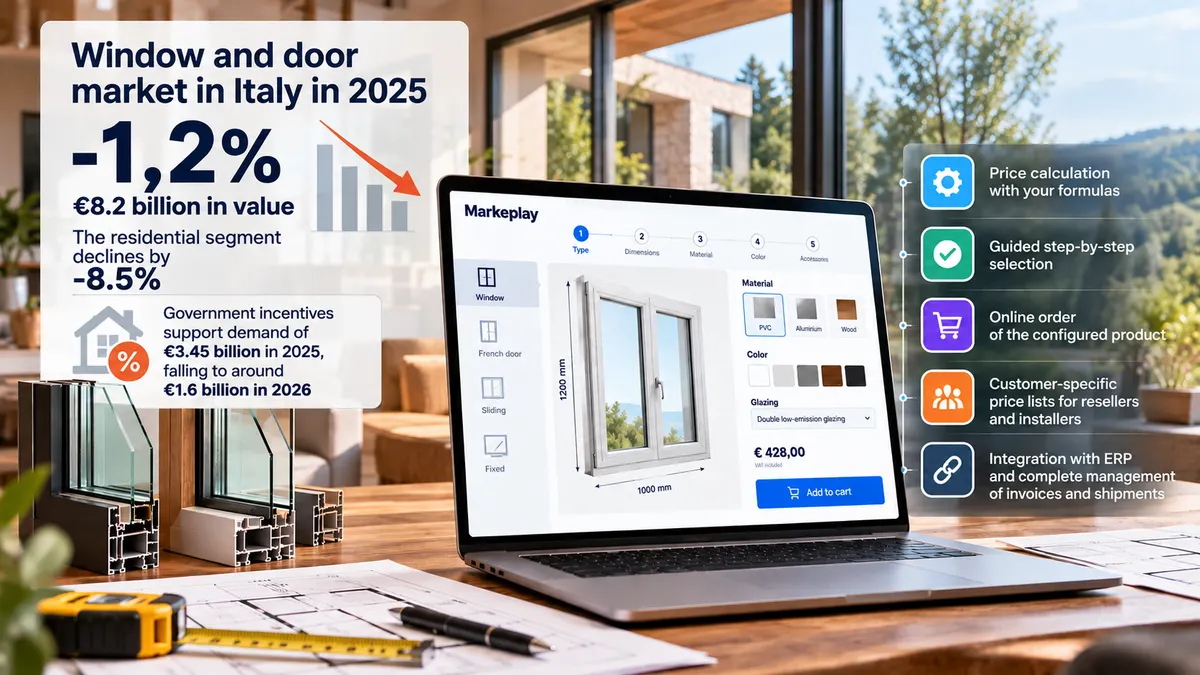
2026 is a hard year for companies selling windows to homeowners in Italy. According to the UNICMI 2026 Report (13 April 2026), the Italian market for windows and curtain walls fell 1.2% in 2025 to €8.2 billion, and residential renovation dropped 8.5%. For 2026, UNICMI expects residential window demand to shrink by another 2%.
The main reason is tax incentives. UNICMI estimates that tax bonuses supported €3.45 billion of window demand in 2025; for 2026 the estimate falls to about €1.6 billion. Under Italy's 2026 Budget Law, window replacement still qualifies for a 50% deduction on a main home (for owners and holders of a real right) and 36% in other cases; from 2027 the rates drop to 36% and 30% (ANCE guide to 2026 building bonuses).
When generous incentives no longer do the selling, three things matter more: how you present the product, how fast you answer with a price, and how many errors you avoid between quote and order. This is where an online window configurator helps.
Why the quote is the bottleneck
Buyers get lost in the options
A window has dozens of variables: material, size, opening type, inside and outside colours, glazing, handles, shutters. Tacton's State of Manufacturing 2026, an April 2026 survey of 280 manufacturing leaders in North America and Europe, found that 39% see buyers overwhelmed by options during selection and 43% struggle with customisation in quoting. (Tacton sells CPQ software: read these as industry-survey figures, not official statistics.)
Response time matters
In the same report, the more digitally mature manufacturers answer requests for quotes within 48 hours more often than the rest (64% vs 47%).
Large companies are paying attention too
Politecnico di Milano's B2b Digital Commerce & Experience Observatory (6 October 2026) lists CPQ features, meaning automated product configuration, among the areas of greatest future interest for 60% of large B2B companies. Metal, electromechanical and appliance companies show the most structured initiatives, because they manage complex catalogues and configuration-and-quoting processes.
What an online window configurator must do
Calculate prices with your rules
A window's price comes from formulas: price per square metre, surcharges for colours, minimum billable sizes, accessories. A good configurator uses your formulas, not a generic table. In Markeplay, the configurator works with a templating system and a proprietary formula editor, so you can build configurations without touching code.
Guide the choice step by step
The buyer doesn't need to know your catalogue: they answer questions (which opening? which size? which colour?) and only see compatible options. That reduces the impossible combinations your technical office fixes by hand today.
Go all the way to the order
Many window-industry tools produce a PDF quote. If you sell online, you also need a cart, payment and everything after. In Markeplay the configurator lives inside the store: the configured product can be ordered, and invoices, credit notes and waybills are handled in the same back office (native features).
Serve resellers and installers too
Window manufacturers often sell to resellers and installers as well as homeowners. On the same platform you can set price lists per customer, group or category, with prices visible only to verified users (B2B E-commerce).
Beyond windows
The same engine works for similar products: roller shutters, blackout systems, curtains and sun shading, made-to-measure fabrics and clothing. These are the cases shown on Markeplay's configurator page.
Markeplay's Windows & Doors Configurator
Markeplay offers a ready-made vertical version for windows, which the product page describes as "a ready-to-use, vertical solution optimized for selling bespoke frames online with millimetric precision and zero errors". You can try the public demo at www.configuratore-infissi.com.
In practice:
- Load your products and pricing formulas into the editor.
- Set the steps the buyer follows: type, size, materials, colours, accessories.
- Publish the configurator in your store with the page builder.
- Receive the order already configured, then issue the invoice and prepare the shipment.
Checklist for choosing a configurator
- Formulas: can I enter my own pricing rules without developers
- Constraints: does the system block combinations that can't be manufactured
- Order: does the configuration become an order paid online, or just a PDF
- Channels: can I sell to homeowners and resellers with different prices
- After the order: are invoices and shipping in the same system
- Maintenance: who updates the platform? In Markeplay, features are native, and maintenance and updates stay with us.
Try the configurator with your products
Look at the demo on configuratore-infissi.com, then load one of your window types with the 30-day free trial: sign up here. If you'd rather start from your price list with our team, request a demo.
Sources
- UNICMI, "Rapporto UNICMI 2026", 13 April 2026: https://www.unicmi.it/in_evidenza/in_evidenza/rapporto-unicmi-2026.html
- ANCE, "Guida ai bonus edilizi 2026" (Law 199/2025, 2026 and 2027 rates), 2026: https://www.lavoripubblici.it/documenti2026/lvpb1/guida-ance-bonus-edilizi-2026.pdf
- Tacton, "The State of Manufacturing 2026" (online survey of 280 leaders, April 2026; CPQ vendor), May 2026: https://www.tacton.com/wp-content/uploads/2026/05/Tacton-State-of-Manufacturing-2026.pdf
- B2b Digital Commerce & Experience Observatory, Politecnico di Milano, 6 October 2026: https://www.osservatori.net/comunicato/b2b-digital-commerce-experience/b2b-digital-commerce-italia/
- Markeplay pages, read 9 October 2026: https://markeplay.com/en/info/configuratore · https://markeplay.com/en/info/e-commerce-b2c · https://markeplay.com/en/info/e-commerce-b2b · https://markeplay.com/en/info/markeplay-connect